At MoveBank, we are making some changes so that banking with us is simpler.
We’re upgrading our digital banking platform to deliver a smoother, more intuitive experience, bringing greater value, better service, and new benefits for our members.
As we make this transition, you’ll continue to receive the same great service from the MoveBank team, whether over the phone, at our branch, or digitally.
We’re here to support you every step of the way, just as we always have.
Click to skip to key information
What's ahead?
A fresh new look
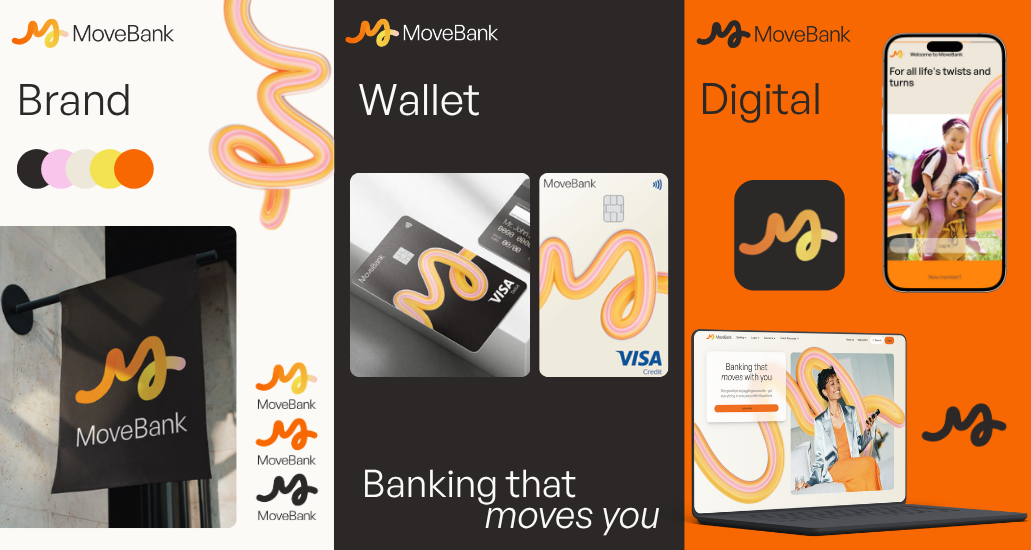
We’re updating our logo, colour scheme, and overall look, inspired by our rail heritage. Our new brand direction draws from the experience of looking out a train window, where the landscape blurs into motion, shaped by speed, direction, and time.
Have upcoming travel plans?
See our FAQs below for more information on how we can support you over Moving Day.
No more monthly account-keeping fees
There will no longer be monthly account-keeping fees on MoveBank transaction accounts.
Better digital banking
You’ll be able to use our new App and Online Banking. These are some of the improved features:
- > Add your card to your digital wallet from the App — use Apple Pay or Google Pay
- - New accounts opened with a card can also instantly add new cards to Digital Wallets
- > Manage your transfer limits — change them when you need to online
- > Added security checks — there will be extra measures to help protect your accounts
Have an existing MoveBank Visa Card?
If you are a current cardholder, you have been sent a new Visa card in the new MoveBank branding.
Please follow the instructions provided with your new card or visit our new website move.bank/movingday to pre-activate it ready for use after Moving Day.
When is the upgrade happening?
Moving Day has been confirmed for Saturday 1st August 2026. This is when the changes take effect, and you can begin using your new card (if you have one), along with the new features on the MoveBank website, as well as the MoveBank App and MoveBank Online.
Please check your postal address, mobile number, and email address are up to date, so we can send you important updates as they’re ready.
Temporary service outage
We are aiming for minimal disruption on Moving Day. There will be an outage of banking and card facilities beginning Friday 31st July 2026 at 7:00pm.
-
Services are expected to be re-instated on the new MoveBank App and Online Banking from Saturday 1st August 2026 at 2:00pm.
-
This means you will not have access to your accounts or be able to use your card during this time.
-
During the outage, fast payments (including Osko and other instant transfers) will be temporarily unavailable. Any transfers made over this period will be processed within the next business day once services are back online.
Please refer to the direct communications we’ve sent you about this and ensure that you have alternate means of payment during the outage window, such as cash on hand for everyday essentials like groceries.
Until then, please keep using our current App and Online Banking until we advise you to make the switch. You can contact us if you need more information or support. Thank you for your patience during this time.
How do I update my contact details?
You can update your details in the existing MOVE Bank App or Online Banking on our website.
You can also speak with one of our team over the phone (1300 362 216) or at our branch.
How do I know a message is really from Move?
Please keep an eye on your email and letterbox for updates from us during the change.
During this time, please stay alert to messages that don’t feel right. We will not ask for your passwords, one‑time security codes, or remote access to your device.
If you’re unsure whether a message is genuinely from us, contact us directly using the phone number on our website or your bank statement.
Key tips to get ready for the upgrade
-
The date for the upgrade has been confirmed – please refer to the direct communications we’ve sent you.
-
You’ll be able to use our new App, Online Banking and Cards from this date.
-
You can access our updated terms and conditions at movebank.com.au/updatedterms.
-
All changes to terms and conditions will take effect from Moving Day.
-
After the upgrade, you may need to re-enable certain payment settings and alerts in the new App or Online banking.
-
You can continue to receive SMS and email alerts for things like upcoming payments. To keep these coming through, simply switch them on in “Notifications preferences” in the new app settings menu, after the upgrade.
-
Please use your 9-digit account number for all payments to your MoveBank account. After the upgrade, membership numbers will no longer be accepted for new payments, so payments sent using a membership number won’t be processed.
-
From Moving Day, you'll see the Confirmation of Payee (CoP) screen when making payments. CoP is a new industry-wide safety check that helps protect you from scams and mistaken payments. Before your payment goes through, it will check the account name you've entered against the recipient's bank details and let you know if they match — giving you the confidence to pay with certainty.
-
Any existing PayTo agreements you’ve set up will need to be re-established with the authorised participating PayTo businesses you previously used. PayTo authorised agreements allow businesses to take payments from your account, within specified limits. You can enable these yourself in the new App or Online Banking.
-
If you have set up a future payment from your MoveBank account to another financial institution, it will show up on your bank statement as a standard transfer after the upgrade. Standard transfers can be scheduled or recurring, and you can expect these payments to be made within the next business day.
-
Each incoming payment can only be deposited into one account. Please note that incoming payments can no longer be split across multiple accounts.
-
You might see fewer BPAY payees listed in your app or online banking after the upgrade. This is because we will not carry across BPAY Customer Reference Numbers (CRNs) that are single-use only and cannot be used for future payments.
-
If you are a current cardholder, you have been sent a new Visa card in the new MoveBank branding. Please follow the instructions provided with your new card to pre-activate it ready for use after Moving Day. You can find the links to the new App or Online Banking to pre-activate your card on our new website at move.bank/movingday
-
If you have not received your new card, please contact us as soon as possible so we can assist.
-
You can change the PIN for your new card in our new App or Online Banking after Moving Day, once your card has been activated.
-
Please keep using your current MoveBank card right up until Moving Day.
What to expect after Moving Day
Please make sure you read and understand the following changes that will come into effect on Moving Day, particularly for products you hold.
-
Please review your payment settings after the upgrade.
-
If you currently have a scheduled payment that pays the minimum monthly payment or the closing balance on your overdraft account, this option will no longer be available after the upgrade. You will need to make these types of payments manually. You can find your minimum payment due on your bank statement. Alternatively, you can set up a scheduled payment for a fixed amount on a chosen frequency.
-
Please be aware that payments to external accounts, including BPAY, cannot be made directly from your loan account. If you have made advance payments on your loan and have funds available for redraw, you can transfer these funds to a MoveBank Transaction or Savings account first and then make the external transfer.
-
If you do not have a MoveBank Transaction or Savings account currently, you can set one up in the existing MoveBank App or Online Banking. You can also send us a secure message in Online Banking or give us a call, and we can help you set one up. Alternatively, you can set up a new Transaction or Savings account yourself on the new platform on Moving Day.
-
If you have automatic repayments set up for your loan, they will continue as they are on the new platform. You'll be able to view or update these scheduled payments under the loan account in the new MoveBank App or Online Banking.
-
Please review your payment settings after the upgrade.
-
If you currently have a scheduled payment that pays the minimum monthly payment or the closing balance on your credit card account, this option will no longer be available after the upgrade. You will need to make these types of payments manually. You can find your minimum payment due and closing on your bank statement. Alternatively, you may set up a scheduled payment for a fixed amount on a chosen frequency.
-
When we upgrade, your historic transactions prior to 6th July will be available in your credit card statement. You can access previous statements with your transaction history in the new MoveBank App or Online Banking. For other queries about past credit card transactions, you can contact us for support.
-
If you have a term deposit that hasn't been funded yet, please note it won't transition into the new platform automatically. To make sure it carries across, please have it funded by Friday AEST 5:00pm 31 July. If you'd like to open a new term deposit, this will be quick and easy from Moving Day onwards — just visit the new MoveBank App or MoveBank Online to get started.
What happens after the upgrade?
Logging in to the new banking platform for the first time
-
For security reasons, all members will be required to reset their password before they can log in to the new banking platform for the first time.
-
You will need an email address and mobile number to do this. Please ensure your contact details are up to date so you can reset your password and access your accounts without interruption.
-
If you do not have an email address and mobile number, please contact us for guidance.
It’s important to check your consents and notification preferences
-
Consents tell us what you’re happy for us to do on your behalf (e.g. automatic payments), or what notifications and communications you would like to receive.
-
If you have any active consents to share your banking data with accredited third-party services or apps, you will need to re-authorise your consent after the upgrade.
-
When we upgrade, please review your consents and notification preferences in the new MoveBank App or Online Banking to make sure everything is working as you’d like it to.
How do I let you know of my upcoming travel plans?
You can send us a secure message in Internet Banking or give us a call on 1300 362 216.
Can I activate my account on Moving Day if I'm overseas?
The account activation process will require an SMS One-Time Password (OTP). As long as you have the ability to receive an SMS to the mobile number linked to your MoveBank profile, you will be able to activate your account.
Can I still receive One-Time Passwords (OTP) if I'm overseas on or after Moving Day?
If you are overseas on or after Moving Day, you can receive One-Time Passwords (OTP) via SMS. If you are planning on using your Australian (+61) mobile number linked to your MoveBank profile during your travels, please ensure you have international roaming enabled on your mobile service.
If you are planning on using an international SIM card/mobile number while travelling, you will need to add this number to your MoveBank profile to continue receiving OTP via SMS.
If you have upcoming travel plans, please let us know as soon as possible.
I will be travelling for an extended period over the Moving Day upgrade and won't have access to my new MoveBank Visa card. What do I do?
If you're travelling during the Moving Day upgrade and won't be home to receive your new MoveBank Visa card, you can pre-activate your new card in the new MoveBank App and immediately add it to your digital wallet, ready for use on Moving Day.
If you require ATM access for cash withdrawals, please ensure you arrange to have some extra cash on hand or carry another bank card that is available for ATM access, until you can obtain your physical MoveBank card.
Can I access an ATM with a digital card?
No, ATMs require a physical card and PIN to check your account balance or withdraw cash.
What is changing?
At MoveBank, we are making some changes so that banking with us is simple and more secure. As part of these changes, we're unveiling a fresh new look and feel, inspired by our rail heritage. You'll notice a new logo and colour scheme applied across our new MoveBank Online, App and website.
Why is Move Bank rebranding?
We’re refreshing our brand and online banking to reflect a more modern MoveBank, while staying true to our rail heritage.
Will my products or services change because of the rebrand?
There will be some changes to the Terms and Conditions of some products and services. You can read the list of Terms and Condition changes here.
Will this rebrand impact fees or interest rates?
We are upgrading to make banking with MoveBank flexible and sustainable for the future. We will continue to review our rates regularly and advise members ahead of any changes.
Does this new platform mean that you're merging with another bank?
No, the purpose of the new platform is to deliver a better banking experience for our members.
What is MoveBank Online?
MoveBank Online is the new internet banking portal coming soon.
Will my money and personal information be safe during the transition to the new banking platform?
Yes, we are taking all the necessary security precautions to ensure that your accounts are transitioned safely across to the new banking platform.
Will the new banking platform be more secure?
Our new banking platform has added technology and protocols for security. This includes the use of SMS one-time passwords for login and key account activity, providing a second layer of authentication. We have also introduced more secure payment technologies, such as Confirmation of Payee, to make sure your money goes to the right person.
What is Moving Day?
This is the date that we upgrade. We will let you know as soon as you can start using the new MoveBank Online and App, as well as your new cards.
Do I need to do anything before Moving Day day to prepare?
Yes, we can help you with what you need to know to prepare. Please make sure your postal address, mobile number, and email address are up to date. Keep an eye on your email and letterbox for our advice, and check our website for more details.
Will I be able to change my daily transfer limit myself?
Yes, using the new MoveBank Online and App, you will be able to change your daily transfer limit.
Will I be able to open a Term Deposit account myself?
Yes, you will be able to open a Term Deposit within the new MoveBank Online and App.
What exactly happens on Moving Day for me as a member?
Your accounts, balances, and transaction history will be moved to the new banking platform. While this is happening, some banking services will be temporarily unavailable for a short period overnight - please refer to the communications we have sent you about this and make sure you have an alternative way to pay if needed.
When the upgrade has been completed, you will be notified about when you start using the new MoveBank Online or App.
Will there be any downtime or service interruptions during the Moving Day?
While we upgrade our systems, some banking services will be temporarily unavailable. Please refer to the direct communications we’ve sent you about this and make sure you have an alternative way to pay if needed. We'll let you know when you can start using our new MoveBank Online or App.
Will I be able to update my TD maturity options in the new Online Banking?
When the Term Deposit product launches in the new MoveBank Online and App, you will be able to change your Term Deposit maturity options.
Is Move Bank still member-owned?
Yes, MoveBank is still member-owned and committed to the ongoing sustainability and values of mutual banking in Australia.
Is MoveBank still committed to supporting the rail community?
The rail community remains an important part of who we are today. Our new branding is inspired by our rail heritage, and our new 24/7 digital banking services provide important flexibility for our members, including shiftworkers.
Will I still be a shareholder?
Yes, if you are currently a shareholder, you will remain a shareholder after Moving Day.
Does my member number change?
No, you will still have the same member number. Please use this to log-in, and remember to use your account number for payments.
I have 2 new member numbers - one for my individual accounts and one for my joint accounts. Will my logins for each stay the same?
Yes, your login details for each of your accounts will remain the same for the first time you login to the new MoveBank App or Online Banking. You will then be prompted to change your password.
You will be able to view your joint accounts when logged into your individual account.
Will you still have a Brisbane branch?
Yes, the MoveBank branch at Level 1, 179 Ann Street, Brisbane will remain open and available during business hours, as listed on our website.
Will I still receive paper statements?
If you have provided us with your email address and mobile number, we'll be sending all statements to you electronically, unless you instruct us to send you paper statements. If you wish to continue receiving paper statements, please let us know before Moving Day by updating your preferences under ‘Statement Options’ in the Online Banking Settings menu, calling us on 1300 362 216, or visiting us in branch. You can request to switch back to paper statements at any time after Moving Day. Please note that paper statements are more likely to be intercepted and therefore increase the risk of fraud on your accounts.
Will I get access to more fee-free ATMs?
All Commonwealth Bank, ANZ, NAB, and Westpac ATMs are fee-free and can be used to withdraw cash using your MoveBank Visa Debit card.
Can I still deposit and withdraw cash?
You can withdraw cash from any ATM, however ATM withdrawal fees may apply. Alternatively, you can deposit and withdraw cash via the Bank@Post service, available at your nearest participating Australia Post Office.
Can I deposit cheques?
You can deposit cheques via the Bank@Post service, available at your nearest participating Australia Post Office.
Will my account numbers change?
No, your account numbers will not change. They will be migrated to the new banking platform.
Do I need to do anything with my pension or Centrelink payments before Moving Day?
Your BSB and 9-digit account number is required for all payments to your MoveBank account. To avoid disruption, please check you are using this account number for these payments, and not your membership number.
Will the way interest is calculated on my savings accounts change on Moving Day?
When we calculate interest on your savings account(s), we’ll use the actual number of days in the year (366 days in a leap year and 365 days in other years) instead of using 365 days for every year.
Is the way interest is paid changing?
Interest will now be paid at the start of each month, rather than on the last day of the month.
Will bonus interest criteria change with the new platform?
No, the bonus interest criteria on our savings accounts will remain the same.
Will I still receive my monthly bonus interest?
Yes, you will receive your monthly bonus interest, providing you have satisfied the account conditions for earning bonus interest.
Will there be any changes to fees and charges after the Moving Day?
To celebrate the launch of our new digital experience, we will be removing the $5 account keeping fee on our transaction accounts. Other fees and charges may still apply.
When will my accounts be available in the new platform?
Keep an eye out for our communications. We will let you know well in advance when your accounts will be available in the new platform.
I have direct debits set up with several service providers. Will I need to update my account details?
If you have any direct debits set up with service providers that use your MoveBank BSB and Account Number, you will not need to update them.
If you have any direct debits that are linked to your existing MoveBank Visa Debit or Credit card, they will need to be updated after Moving Day with your new card details, once you have received and activated it.
Will the way interest is charged on my loan accounts change?
Interest charged on your loan account(s) will now line up with how often you make repayments (monthly, fortnightly or weekly).
Will the way interest is calculated on my loan accounts change on Moving Day?
When we calculate interest on your loan account(s), we’ll use the actual number of days in the year (366 days in a leap year and 365 days in other years) instead of using 365 days for every year.
I have a home loan with Move and have automatic repayments set up. Will I have to set them up again after Moving Day?
The automatic repayments you have set up for your home loan will continue as they are on the new platform. You'll be able to view or update these scheduled payments under the loan account in the new MoveBank App or Online Banking.
Do I need to hold insurance on security held for my MoveBank loan?
If you have a MoveBank Home Loan or secured Car Loan, you’ll need to hold comprehensive, third‑party and public liability insurance on any property or vehicle used as security.
Can I make a payment directly from my loan account on the new platform?
You will not be able to make any external transfers (including BPAY) directly from your loan account on the new platform. If you have funds in your loan account that are available for redraw, you will need to transfer these funds to a transaction or savings account first before making any external payments.
If you don't have a MoveBank transaction or savings account, please contact us to set one up. Alternatively, you can open an account in a few minutes after Moving Day via the new MoveBank App or Online Banking.
My new home loan is approaching settlement. Will the Moving Day outage impact my settlement timeframe?
Settlements for any purchase or sale with a contract date will proceed as scheduled.
Will the existing alerts I have set up on my accounts stay the same?
Please check your alert settings after we upgrade - you will need to reactivate alerts to ensure things are working as you expect them to. Push notifications are available in the new app and can be turned on or off in your phone’s settings.
Will the nicknames I have set up for my accounts stay the same?
Yes, the nicknames you have currently set up for your accounts will stay the same after we upgrade.
I only just got a new MoveBank Visa Debit card. Does this mean I have to get another one?
Yes, you will be sent a replacement Visa Credit card and you will need to pre-activate this card to start using it immediately after Moving Day. Please follow the activation instructions sent to you with your replacement card.
Will there be any changes to card features or limits?
At this stage, there are no changes to card features or limits. You will be contacted if there are any changes planned.
Will I still be able to see all of my transaction history?
You will still be able to view all transaction history prior to Moving Day for each of your transaction and savings accounts in the new MoveBank Online or App.
If you hold a MoveBank Credit card, your transaction history prior to Moving Day will be available on past statements.
What should I do if I'm overseas during Moving Day?
If you have upcoming travel plans, please notify us as soon as possible.
Will you offer digital cards on the new platform?
Yes, you can order a card in the new app and start spending immediately using a digital version, before your physical card arrives.
Will my card numbers change on my new replacement card?
Yes, if you currently hold an existing MoveBank Visa Card, we will be issuing you a new card with new card numbers.
Will my old Move Bank debit/credit card still work after Moving Day?
No, your existing MoveBank cards will no longer work after we upgrade. Ahead of Moving Day, we will send you a new card with new card numbers - please follow the instructions supplied with this.
How do I activate a new card if I receive one?
Please follow the instructions that are supplied with your new card to pre-activate it ahead of Moving Day.
I have my MoveBank card linked to a lot of services. Will I have to update them to be my new card details and when?
As with any new card, you will need to update your card details for all service providers that you have your MoveBank card linked to. Once your new card has been activated on Moving Day, we recommend you update your card details for all associated services as soon as possible.
Will my card PIN remain the same after the Moving Day? My card isn’t working—what should I do?
Your replacement Visa Debit card will come with a new PIN. You will receive this new PIN in a separate mail. If you have activated your new card prior to Moving Day, this PIN will remain the same. You will be able to change your card PIN in the new App or Online Banking if you wish after the upgrade.
Will my card transaction history still be available after the Moving Day?
If you have an existing transaction account, your card transaction history will be available after Moving Day.
Will my old MoveBank debit/credit card still work after Moving Day?
No, your existing MoveBank cards will no longer work after we upgrade. Ahead of Moving Day, we will send you a new card with new card numbers - please follow the instructions supplied with this.
What should I do if I don’t receive my new card?
If you have an active Visa Debit card and haven’t received your replacement, please contact us as soon as possible via Secure Message in Online Banking, emailing us at info@movebank.com.au, or by calling us on 1300 362 216.
When can I change my card PIN?
You will be able to change your card PIN in the MoveBank App or Online Banking after Moving Day, once you have activated your card.
Does this mean I won’t be able to use my card during the Moving Day service outage period?
During the service outage on Moving Day, you won't be able to use your MoveBank card. Please ensure that you have arranged alternative methods of payment during this time.
I don’t have a smart phone. Will I still be able to bank with Move?
To access digital banking features, you will need a device that has the capability to download the MoveBank App or access MoveBank Online via a web browser.
I don’t have an email address and haven’t needed one for my banking before. Why do I need one now?
To access digital banking features via the new MoveBank Online or App, you will need to register using a current email address and mobile number. Providing these details also ensures that we can continue to provide you with timely updates, support, and protection, especially as more services move online.
We understand that not everyone uses digital channels regularly, and we remain committed to supporting you in the way that suits you best.
I don’t have a mobile number and haven’t needed one for my banking before. Why do I need one now?
To access digital banking features via the new MoveBank Online or App, you will need to register using a current mobile number and email address. Providing these details also ensures that we can continue to provide you with timely updates, support, and protection, especially as more services move online.
We understand that not everyone uses digital channels regularly, and we remain committed to supporting you in the way that suits you best.
I only have a landline phone number. Will that do?
No, we require a mobile number as this is the only way we can send you SMS messages with one-time codes. One-time codes add an extra level of security to your banking by using a two-step verification process.
I don’t have a unique mobile number. I share one mobile with my husband/wife. What do I do?
You can share a mobile number with a joint account holder. If you have your own unique mobile number, it is recommended to use this for your individual account to enhance your security.
I don’t have a mobile phone number and don’t want a mobile phone. Can I still bank with Move?
You can still bank with Move, but you will not enjoy all the benefits of our digital banking services. For security reasons, all members will be required to reset their password after we upgrade, and you will need an email address and mobile number to do this. If you do not have a mobile number, please contact us for guidance.
When do I have to get myself an email address and mobile number?
To be able to activate your account and get started on the new MoveBank Online or App on Moving Day, you will need to have provided us with your current email address and mobile number.
I don’t remember my existing internet banking password. How will I activate my account?
When you log in to the new MoveBank App or Online Banking for the first time, you will be only be asked for your member number. We will then send you a password reset link to your nominated email address. You will then be able to enter a new password that you use to log in to the new MoveBank App or Online Banking.
I have found another MoveBank website at https://move.bank. Is this a legitimate website?
Yes, https://move.bank is the new MoveBank website. On Moving Day, this is the website you will access Online Banking and find out more information on our current products.
I can see two Move Bank apps in the app store. Which one do I use?
If you are an existing member, we will notify you when the new MoveBank App is ready to use. You will be able to see your new accounts in the new app then. If you are trying to pre-activate a new MoveBank card, please follow the instructions supplied with your new card.
Should I have received new login details to access the new platform?
Your member number is all you need to log in to the new MoveBank App or Online Banking for the first time. You will immediately be prompted to set your password. Please follow the on-screen instructions to complete this step. Please note: this password is only for logging in to the new digital experience - your existing MOVE Bank App and Online Banking password is not impacted/reset.
Can I still access old statements through the new app or internet banking?
Yes, your historical statements remain accessible online, and you can generate new statements as well.
Can I still send and receive messages within the new MoveBank App and Online Banking?
You will be able to send us a message via the Live Chat in the new MoveBank App and Online Banking.
Do I need to download a new app or update the existing one?
Yes, you will need to download the new MoveBank app from the Apple App Store or Google Play Store on Moving Day.
If you are a current MoveBank cardholder and have received your new replacement card in the mail, you can download the new App now to pre-activate it ready for use on Moving Day. Follow the instructions that came with your card or visit our new website move.bank/movingday to find the App Store links.
Will my biometric login (Face ID / fingerprint) still work on the new app?
The new MoveBank app supports biometric login such as Face ID or fingerprint scanning, however you will need to set up your biometric login again in the new app before you can start using it.
Will my saved payees carry over to the new platform?
No, you will need re-add any previously saved payees in the new banking platform.
How will you notify me about important changes?
Please keep an eye on your email and letterbox for updates from us during the change. During this time, please stay alert to messages that don’t feel right. We will not ask for your passwords, one‑time security codes, or remote access to your device.
How do I update my contact details to ensure I receive all communications?
You can review and update your contact details in the current MOVE Bank internet banking portal, mobile app or by calling us on 1300 362 216.
I will be travelling overseas during the Moving Day period, how will I be able to activate my account?
If you are going to be overseas during the Moving Day period, please contact us as soon as possible to notify us. This will ensure that we can support you in getting you started in the new MoveBank Online or App.
Can I still call to get help with my banking?
With the new MoveBank Online and App, you can do more banking tasks yourself 24/7, with access to Live Chat on the app for support. You can also still phone us on 1300 362 216 during the operating hours listed on our website or visit us in our branch.
Are you outsourcing your contact center overseas?
No, our contact centre is and will continue to be based in Australia.
Can I still call to get help with my banking?
With the new MoveBank Online and App, you can do more banking tasks yourself 24/7, with access to Live Chat on the App or Online Banking for support. You can also still phone us on 1300 362 216 during the operating hours listed on our website or visit us in our branch.